Control Flow Nodes
Control Flow Nodes enable your pipeline to make decisions, route execution down different paths, and implement conditional logic. These nodes form the "decision-making" layer of your workflow, allowing pipelines to adapt behavior based on data, conditions, and intelligent reasoning.
Available Control Flow Nodes:
- Router Node - Route execution based on condition matching with multiple named paths
- Decision Node - LLM-powered intelligent routing based on natural language criteria
- Human-in-the-Loop Node - Pause execution and request a human decision before proceeding
Router Node
The Router Node evaluates a condition and routes pipeline execution to one of multiple named paths. It uses template-based conditions (similar to Jinja2 syntax) to determine which route to take, with a default fallback route if no conditions match.
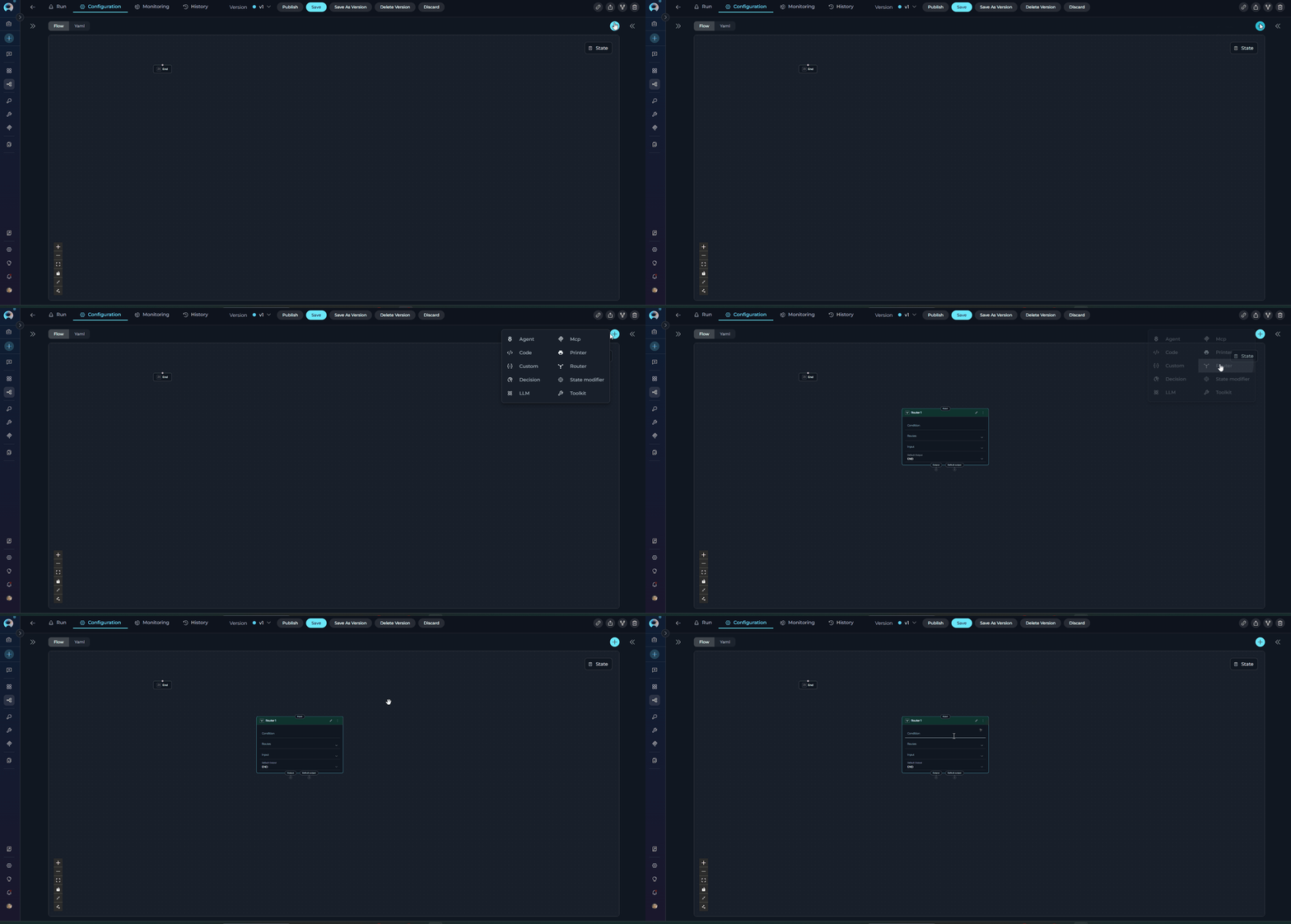
Purpose
Use the Router Node to:
- Route execution to different paths based on state variable values
- Implement branching logic with multiple named routes
- Evaluate complex conditions using template syntax
- Provide fallback behavior with default output
- Create multi-path workflows based on data conditions
- Create loops and iterative execution by routing back to previous nodes
Parameters
| Parameter | Purpose | Type Options & Examples |
|---|---|---|
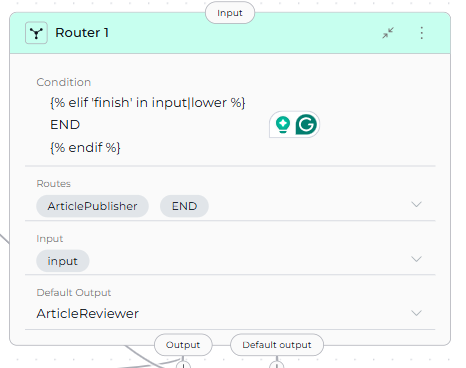
| Condition | Define the conditional logic that determines which route to take | Syntax: Template syntax (Jinja2-like) Operators: {% if condition %} - Start conditional block{% elif condition %} - Alternative condition{% else %} - Fallback condition{% endif %} - End conditional blockState Variables: Use variable names directly (e.g., input, status, priority)Filters: \|lower, \|upper, in operator for substring matchingExample: {% if 'approved' in input|lower %} ArticlePublisher {% elif 'finish' in input|lower or 'complete' in input|lower %} END {% endif %} |
| Routes | Define the named paths (node IDs) that the router can select | Configuration: List of node IDs that correspond to the route names returned by the condition Example: - ArticlePublisher- ENDImportant: Route names in the condition must exactly match node IDs in the Routes list |
| Input | Specify which state variables the Router node reads for condition evaluation | Default states: input, messagesCustom states: Any defined state variables Example: - input- status- user_type |
| Default Output | Specify the fallback route if no conditions in the Router match | Options: Select a node ID from available nodes in the pipeline Example: ContentModeratorFallback Behavior: If the condition doesn't return any route name, execution goes to Default Output |
| Interrupt Before | Pause pipeline execution before the Router node executes | Enabled / Disabled |
| Interrupt After | Pause pipeline execution after the Router node for inspection | Enabled / Disabled |
Route Name Matching
Route names in the condition must exactly match node IDs in the pipeline. Case sensitivity matters: "ArticlePublisher" ≠ "article_publisher".
YAML Configuration
state:
  input:
    type: str
    value: ''
  messages:
    type: list
entry_point: Router 1
nodes:
  - id: Router 1
    type: router
    condition: |2-
          {% if 'approved' in input|lower %}
          ArticlePublisher
          {% elif 'finish' in input|lower or 'complete' in input|lower %}
          END
          {% endif %}
    input:
      - input
    routes:
      - ArticlePublisher
      - ContentModerator
      - END
    default_output: ContentModerator
  - id: ArticlePublisher
    type: toolkit
    toolkit_name: publishing_toolkit
    tool: publish_article
    input:
      - input
      - messages
    output:
      - messages
    input_mapping:
      article_content:
        type: variable
        value: input
      status:
        type: fixed
        value: published
    structured_output: false
    transition: END
  - id: ContentModerator
    type: llm
    prompt:
      type: string
      value: Review content for policy compliance and quality standards
    input:
      - input
      - messages
    output:
      - messages
    input_mapping:
      system:
        type: fixed
        value: You are a content moderator checking for policy violations and quality issues
      task:
        type: fstring
        value: 'Review this content: {input}'
      chat_history:
        type: variable
        value: messages
    structured_output: false
    transition: END
Jinja Syntax Examples
The Router Node uses Jinja2-like template syntax for condition evaluation. Here are common patterns:
String Matching:
Multiple Conditions with elif:
{% if priority == 'high' %}
UrgentHandler
{% elif priority == 'medium' %}
NormalHandler
{% elif priority == 'low' %}
LowPriorityHandler
{% else %}
DefaultHandler
{% endif %}
Logical Operators:
{% if status == 'approved' and priority == 'high' %}
FastTrackPublisher
{% elif status == 'approved' or status == 'pending' %}
ReviewQueue
{% endif %}
Numeric Comparisons:
{% if score > 80 %}
HighQualityPath
{% elif score >= 50 %}
MediumQualityPath
{% else %}
LowQualityPath
{% endif %}
String Filters:
{% if input|upper == 'APPROVED' %}
ApprovalNode
{% elif 'reject' in input|lower %}
RejectionNode
{% endif %}
Complex Conditions:
Router Node for Loops
The Router evaluates the condition from top to bottom. When a condition matches, it returns the associated route name and execution proceeds to that node. If no conditions match, execution goes to the default output
Router nodes can create loop structures by routing back to previous nodes. This enables iterative processing by:
- Routing to an earlier node when a condition is met (e.g., counter < max_iterations)
- Routing to the next node or END when the loop should exit
- Using state variables to track iteration count and control loop termination
This is an alternative to Loop and Loop from Tool nodes, offering more precise control over loop conditions and execution flow.
Best Practices
- Always Provide Default Output: Ensure fallback behavior for unmatched conditions to prevent pipeline failures.
- Match Route Names Exactly: Route names in condition must match node IDs exactly (case-sensitive).
- Order Conditions by Specificity: Place most specific conditions first to avoid unintended matches.
- Use Filters for String Comparisons: Normalize strings with
|loweror|upperfor reliable matching. - List All Routes: Include all possible routes in the Routes list for clarity and validation.
- Test All Paths: Ensure every condition path is reachable and test edge cases.
- Use Descriptive Route Names: Name routes clearly to indicate their purpose (e.g., "ApprovedWorkflow" not "Path1").
- Document Complex Conditions: Add comments in YAML to explain routing logic for maintainability.
- Use Router for Loop Control: When creating loops, use state variables (counters, flags) to control loop termination and prevent infinite loops.
Decision Node
The Decision Node uses LLM intelligence to make routing decisions based on natural language criteria. It operates as a standalone node in the pipeline and analyzes the input to intelligently select the appropriate output path from multiple decision outputs.
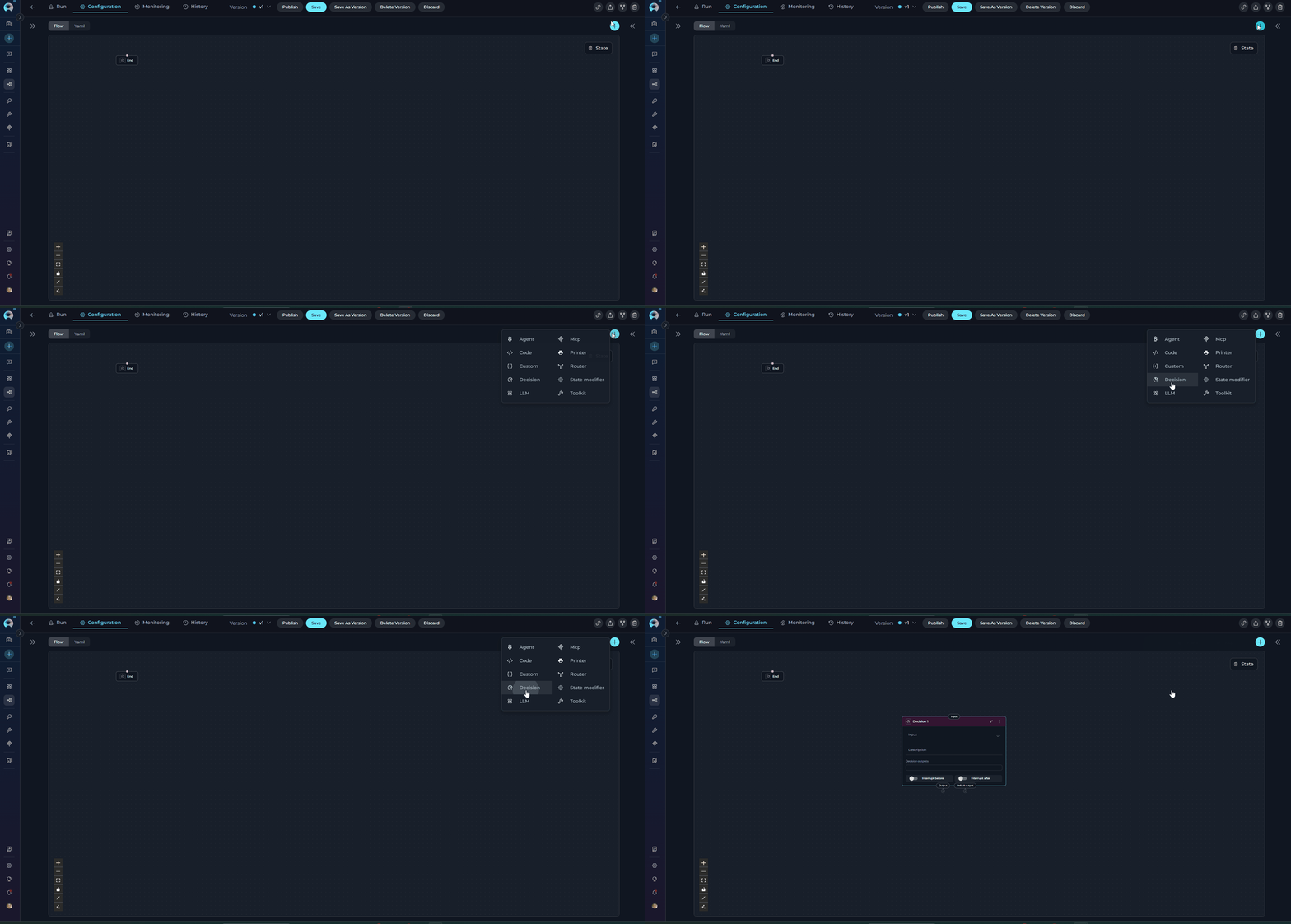
Purpose
Use the Decision Node to:
- Make intelligent routing decisions using LLM reasoning
- Route based on natural language criteria without writing conditions
- Handle complex decision logic that's difficult to express in templates
- Leverage context and semantics for routing decisions
- Simplify decision-making with descriptive instructions
LLM Overhead
Decision Nodes are slower than Router nodes due to LLM processing. Use for complex routing requiring semantic understanding, not simple condition matching.
Decision Node Chaining Restriction
Decision nodes cannot be connected to another Decision node. If you need sequential decision-making, use a different node type (such as Router, LLM, or Code) between Decision nodes.
Parameters
| Parameter | Purpose | Type Options & Examples |
|---|---|---|
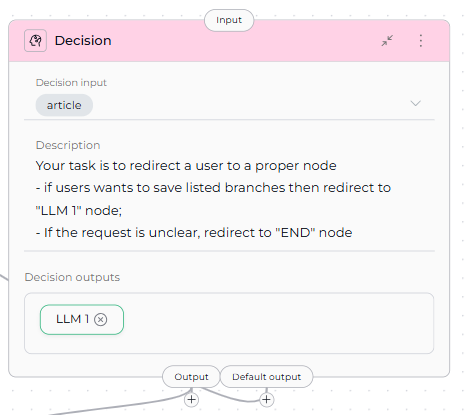
| Input | Specify which state variables the LLM analyzes to make the routing decision | Default states: input, messagesCustom states: Any defined state variables Example: - input- messagesUsage: The LLM reads these state variables' content and analyzes them against the description criteria |
| Description | Provide natural language instructions describing how the LLM should make routing decisions | Format: Clear, structured instructions with specific routing criteria Example: Your task is to route content based on user intent: - if user wants to publish the content, redirect to "ArticlePublisher" node - if user wants content review or moderation, redirect to "ContentModerator" node - If the request is to finish or end the process, redirect to "END" node Best Practices: Use clear criteria, specific examples, structured format |
| Decision Outputs (nodes) | Define the possible output paths (node IDs) the LLM can select from | Configuration: List of node IDs that the LLM can route execution to Example: - ArticlePublisher- ContentModeratorHow It Works: LLM analyzes input, reviews description, selects appropriate output from list |
| Default Output | Specify the fallback route if the LLM cannot make a confident decision | Options: Select a node ID from available nodes in the pipeline Example: ENDFallback Behavior: If LLM can't decide confidently, execution goes to Default Output |
| Interrupt Before | Pause pipeline execution before the Decision node executes | Enabled / Disabled |
| Interrupt After | Pause pipeline execution after the Decision node for inspection | Enabled / Disabled |
 YAML Configuration
state:
  input:
    type: str
    value: ''
  messages:
    type: list
entry_point: Decision 1
nodes:
  - id: Decision 1
    type: decision
    description: |
      Your task is to route content based on user intent:
      - if user wants to publish the content, redirect to "ArticlePublisher" node
      - if user wants content review or moderation, redirect to "ContentModerator" node
      - If the request is to finish or end the process, redirect to "END" node
    input:
      - input
      - messages
    nodes:
      - ArticlePublisher
      - ContentModerator
    default_output: END
  - id: ArticlePublisher
    type: toolkit
    toolkit_name: publishing_toolkit
    tool: publish_article
    input:
      - input
      - messages
    output:
      - messages
    input_mapping:
      article_content:
        type: variable
        value: input
      status:
        type: fixed
        value: published
    structured_output: false
    transition: END
  - id: ContentModerator
    type: llm
    prompt:
      type: string
      value: Review content for policy compliance and quality standards
    input:
      - input
      - messages
    output:
      - messages
    input_mapping:
      system:
        type: fixed
        value: You are a content moderator checking for policy violations and quality issues
      task:
        type: fstring
        value: 'Review this content: {input}'
      chat_history:
        type: variable
        value: messages
    structured_output: false
    transition: END
LLM Decision Process
The Decision Node operates as a standalone node that uses LLM to:
- Read input state variables (configured in
inputparameter) - Analyze description for routing criteria
- Select appropriate output from
nodeslist - Return selected node ID for routing
- If uncertain, defaults to
default_output
Best Practices
- Write Clear Decision Criteria: Provide specific, unambiguous routing rules with examples for each path.
- Provide Examples in Description: Help the LLM understand expected routing with concrete examples.
- Always Define Default Output: Provide fallback for unclear cases to prevent pipeline failures.
- List All Decision Outputs: Include all possible routing targets in the
nodeslist. - Structure Descriptions Clearly: Use headings, lists, and clear formatting to organize routing criteria.
- Use Decision Node for Complex Routing: Choose when routing requires semantic understanding, not simple condition matching.
- Configure Input Variables: Include relevant state variables in
inputfor the LLM to analyze. - Test with Various Inputs: Verify LLM routing across different scenarios and edge cases.
- Monitor Decision Quality: Review LLM routing decisions periodically and refine description if needed.
- Provide Context in Description: Help the LLM make better decisions by explaining the use case.
- Use Descriptive Output Names: Name outputs clearly to match description (e.g., "TechnicalSupport" not "Output1").
- Use Interrupts for Debugging: Enable interrupts to review decision-making and routing results during development.
Human-in-the-Loop Node
The Human-in-the-Loop (HITL) Node pauses pipeline execution and waits for a human decision before continuing. It presents a configurable message to the user and provides up to three action buttons — Approve, Edit, and Reject — each routing to a different downstream node.
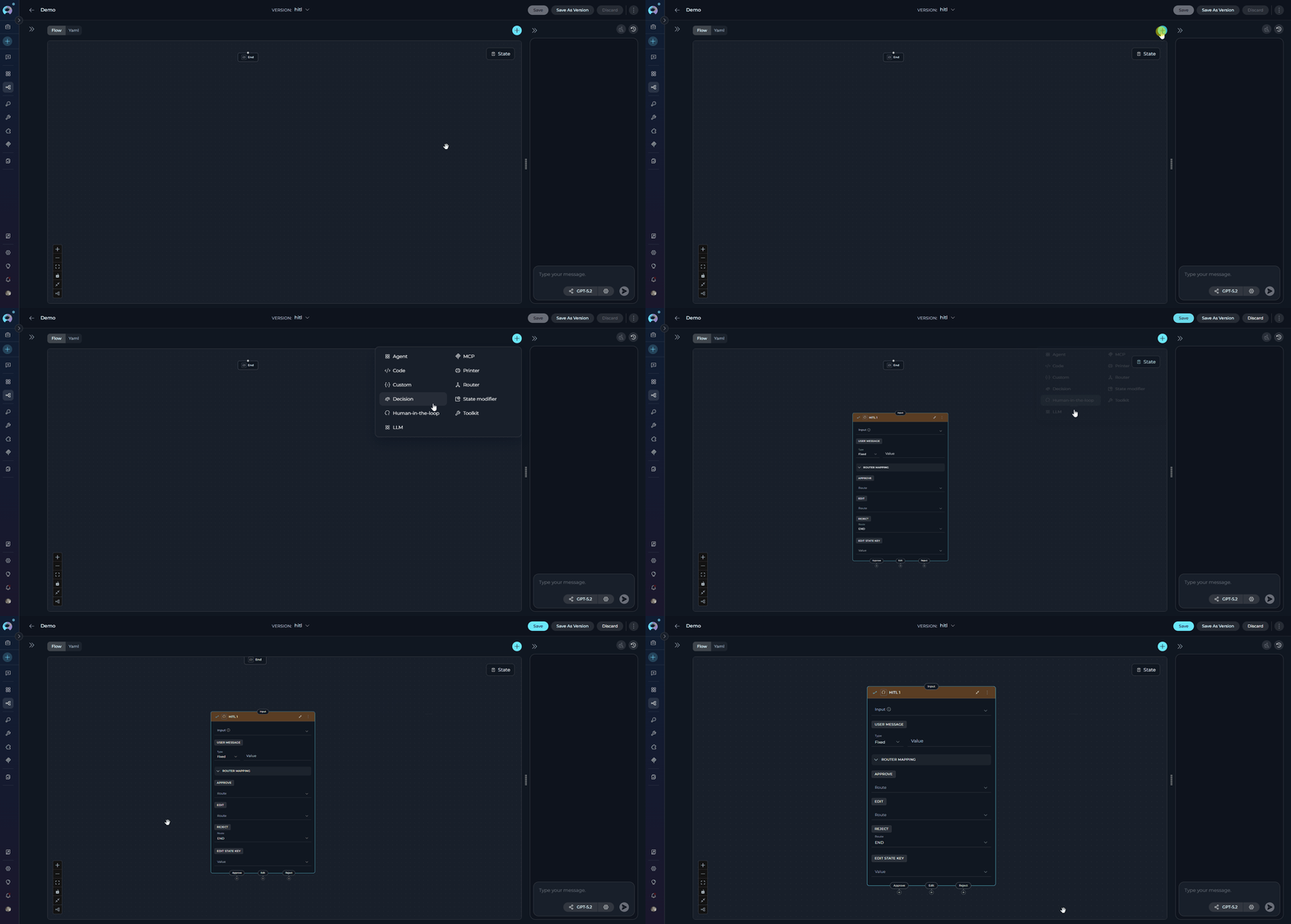
Purpose
Use the HITL Node to:
- Gate critical actions — require human sign-off before irreversible steps
- Validate AI output — let a human review and approve content generated by previous nodes
- Allow human correction — give users the ability to edit a state value before the pipeline continues
- Implement approval workflows — build multi-step review processes where humans are in the decision path
- Enforce compliance checkpoints — ensure sensitive operations are authorized by a person
Parameters
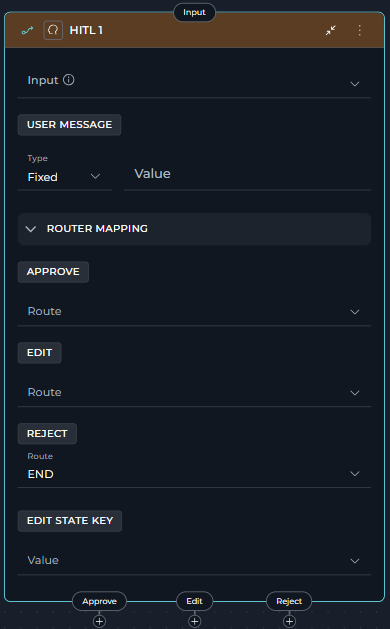
| Parameter | Purpose | Type Options & Examples |
|---|---|---|
| Input | State variables available for interpolation in the User message when using F-String type | Default: []Custom: Any defined state variables Example: - summary- draft_content |
| User Message Type | How the message presented to the user is constructed | Fixed - Static textExample: "Please review the generated summary and choose an action."F-String - Text with {state_key} placeholders resolved at runtimeExample: "Review the following draft:\n\n{summary}"Variable - Entire message taken from a single state variableExample: review_message |
| User Message Value | The message content shown to the user at the interrupt point | Depends on type: - Fixed: plain text - F-String: template with {state_key} placeholders- Variable: name of a state variable |
| Approve Route | Next node when the user clicks Approve | Any registered node name or ENDExample: publish_node |
| Reject Route | Next node when the user clicks Reject | Any registered node name or ENDExample: END |
| Edit Route | Next node when the user clicks Edit | Any registered node name (cannot be END)Example: regenerate_nodeRequires edit_state_key to be set |
| Edit State Key | The state variable updated with the user's edited value when the Edit action is chosen | Must match an existing state variable name Example: summaryRequired when an Edit route is configured |
Edit Route Constraints
The Edit action is only available to users when both conditions are met:
edit_state_keyis set to a valid state variable name.- Edit route is configured and does not point to
END.
If either condition is missing, the Edit button will not appear in the UI.
How It Works
- The node builds the user-facing message from the configured
user_message. - Pipeline execution pauses using LangGraph's dynamic interrupt mechanism.
- The UI displays the message along with action buttons for each configured route.
-
The user chooses an action:
Action Button Color State Change Behavior Approve 
None Pipeline resumes and routes to the Approve route Reject 
None Pipeline resumes and routes to the Reject route Edit 
edit_state_keyupdated with user's inputA text input appears; user provides the revised value, then pipeline routes to the Edit route -
Execution continues from the target node.
YAML Configuration
state:
  messages:
    type: list
  input:
    type: str
  summary:
    type: str
    value: ''
entry_point: Review_summary
nodes:
  - id: Review_summary
    type: hitl
    input:
      - summary
    user_message:
      type: fstring
      value: "Please review the following summary and choose an action:\n\n{summary}"
    routes:
      approve: Publish_node
      reject: END
      edit: Regenerate_node
    edit_state_key: summary
Route Handling
The HITL node uses LangGraph's Command(goto=) pattern for routing — no explicit transition field or conditional edges are needed. All route target nodes must exist in the pipeline.
UI Behavior
When the pipeline reaches a HITL node during a run, the chat panel displays the configured user message and action buttons for each configured route. Only buttons with valid routes appear. After the user clicks an action, the pipeline resumes automatically.
Approve
Appears when: the approve route is configured.
-
The Approve button signals that the user accepts the content or action as-is. Clicking it immediately resumes the pipeline and routes execution to the node specified in
approve. No state variables are modified — the pipeline continues with the same state it had when it paused.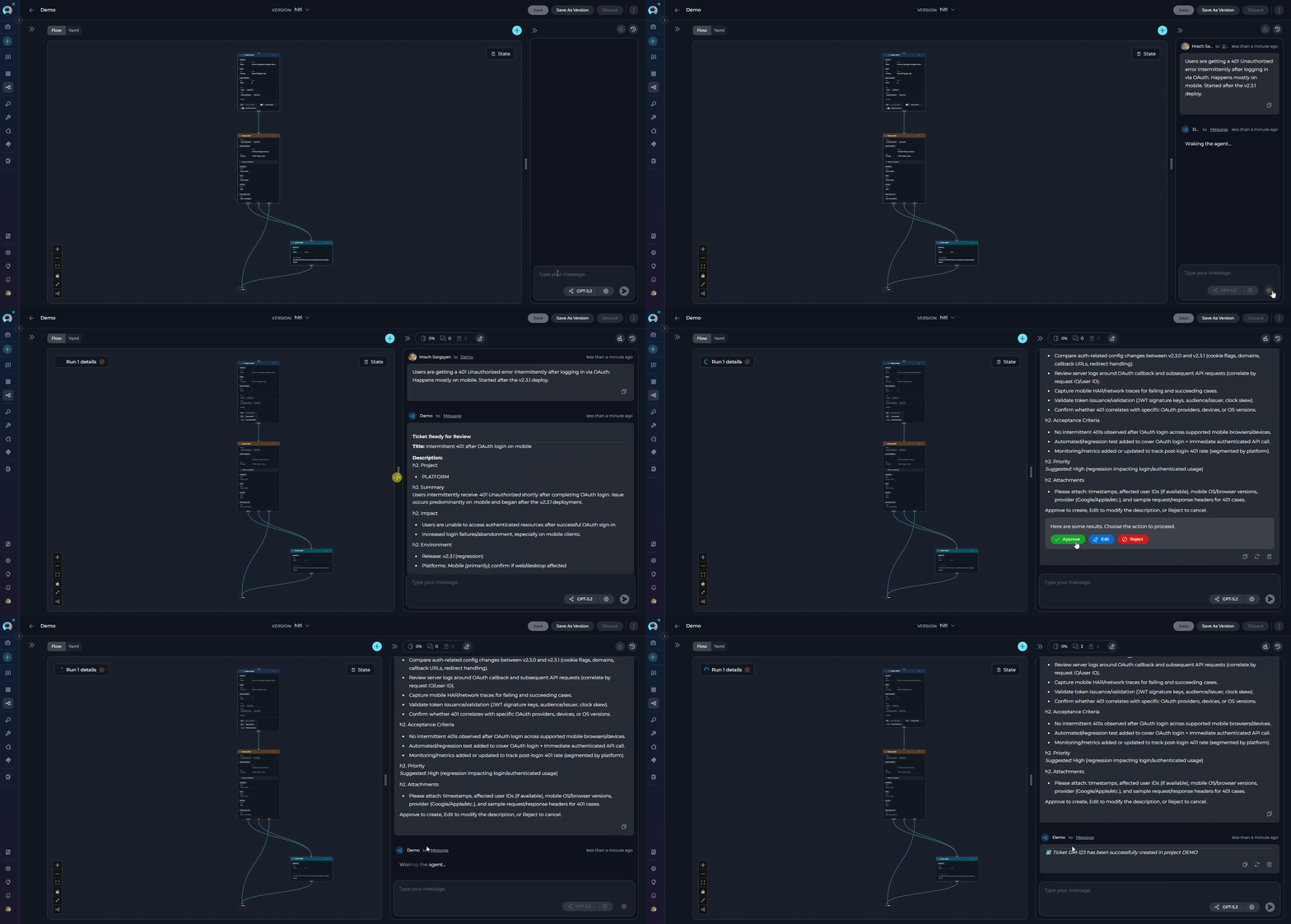
Use this when: the generated output is correct and ready for the next step (e.g., publishing content, creating a ticket, sending a notification).
Edit
Appears when: both an edit route and a valid edit_state_key are configured (and the Edit route does not point to END).
-
The Edit button allows the user to revise a specific piece of content before the pipeline continues. Clicking it opens a text input field pre-filled with (or adjacent to) the current value of the
edit_state_keystate variable. After the user submits the revised text, the pipeline updatesedit_state_keywith the new value and routes execution to the node specified inedit.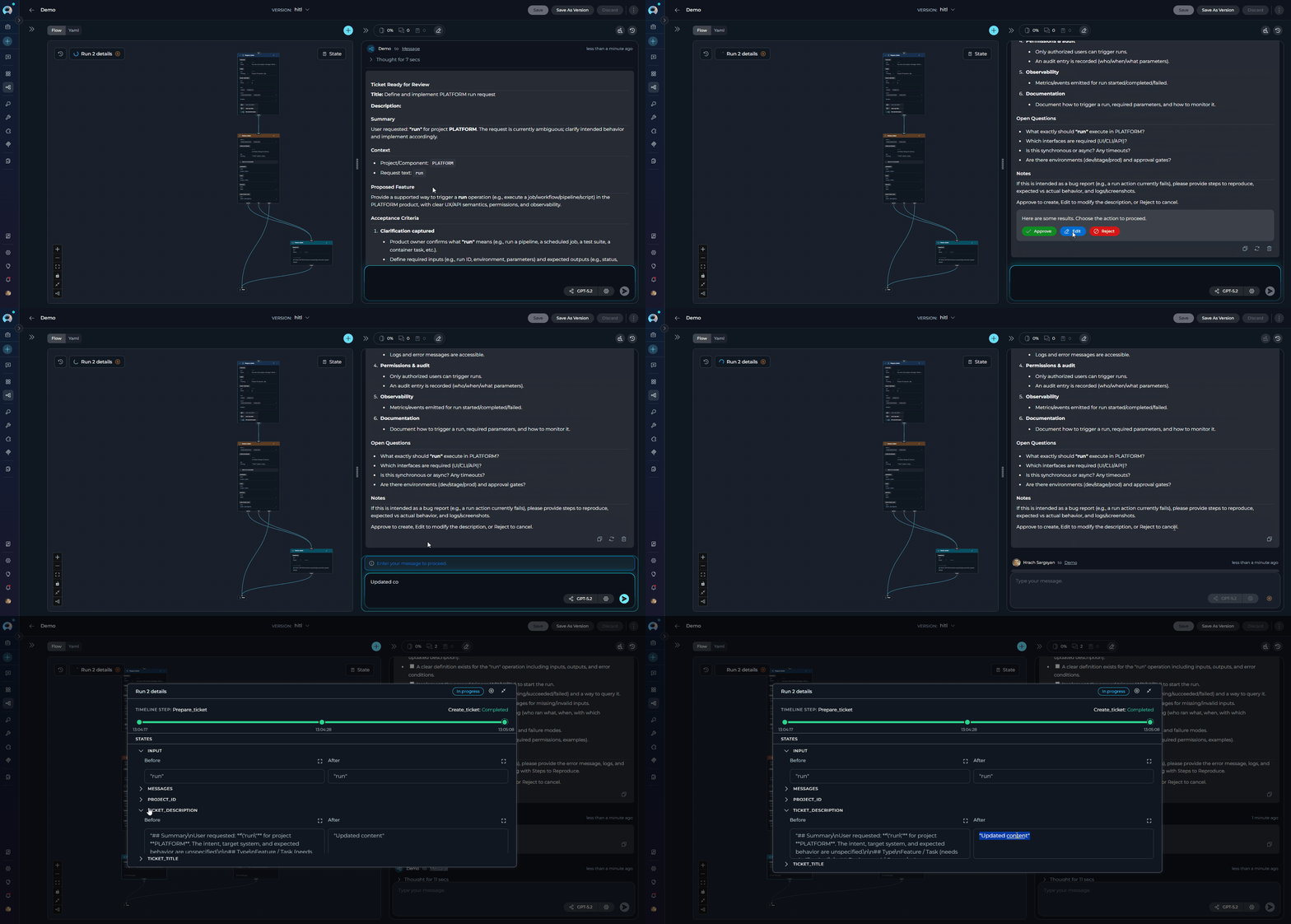
Use this when: the output is mostly correct but needs minor adjustments — for example, rewording a ticket description or correcting a generated summary — without restarting the full generation process.
Reject
Appears when: the reject route is configured.
-
The Reject button (red) signals that the user has declined the content or action entirely. Clicking it resumes the pipeline and routes execution to the node specified in
reject— typicallyENDto cancel the workflow, or a regeneration node to start over. No state variables are modified.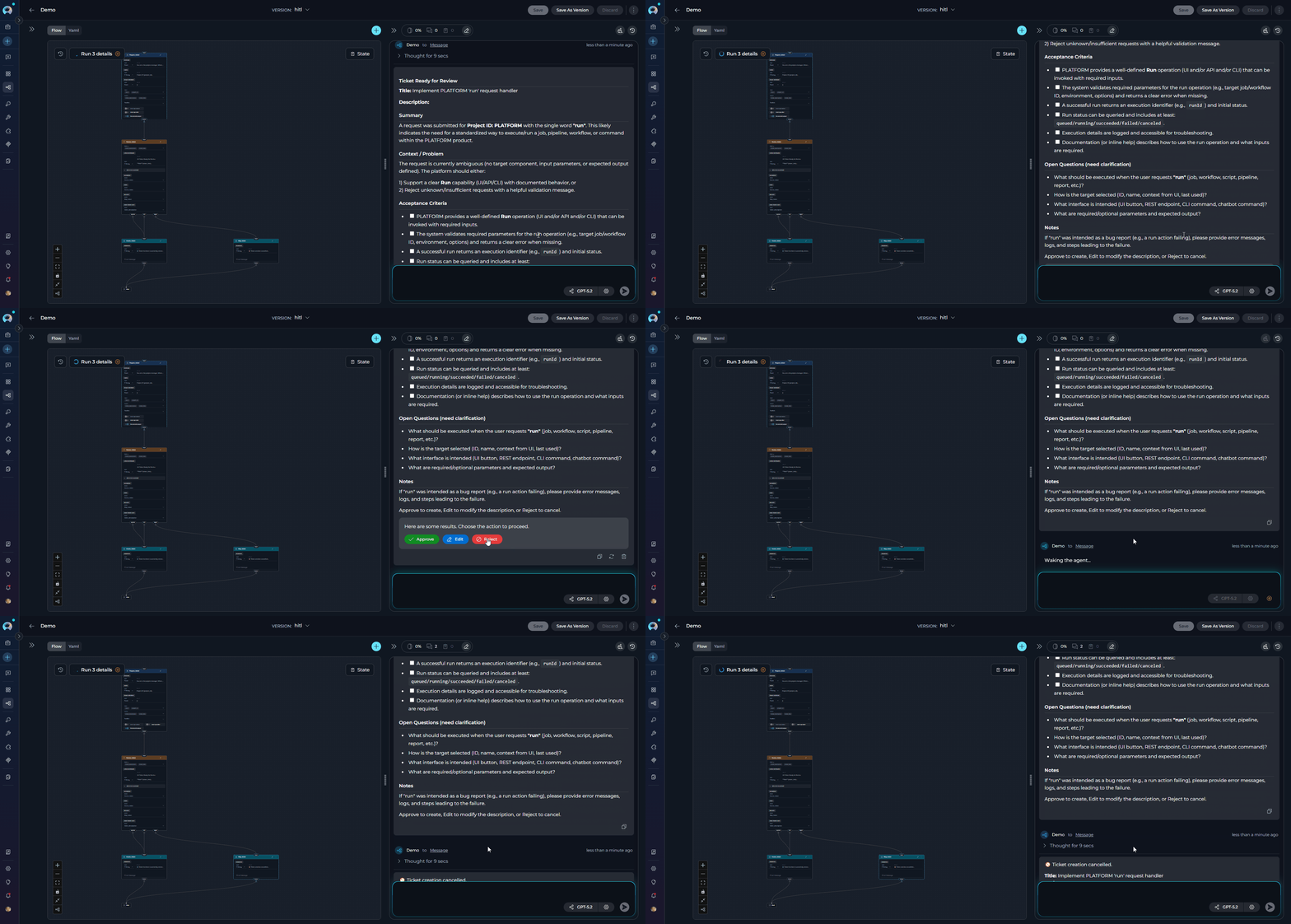
Use this when: the output is unacceptable and the pipeline should be stopped or fully restarted rather than edited inline.
Limitations
- The Edit route cannot point to
END. edit_state_keymust be set for the Edit button to appear; it must reference a state variable that already exists.- Because HITL uses a dynamic interrupt, the pipeline must be running with checkpoint/memory support (a
thread_idmust be active) for the resume to work correctly. - Each HITL node can handle only one pending interrupt at a time.
- The node does not modify state on Approve or Reject — only Edit mutates state.
Best Practices
1. Place HITL Before Irreversible Actions
Always gate destructive or hard-to-undo operations:
✅ Good:
2. Use F-String to Show Relevant Context
Show users the content they are reviewing:
✅ Good:
- id: Review_ticket
  type: hitl
  input:
    - ticket_title
    - ticket_description
  user_message:
    type: fstring
    value: |
      ## Ticket Ready for Review

      **Title:** {ticket_title}

      **Description:**
      {ticket_description}

      Approve to create the ticket, Edit to modify, or Reject to discard.
  routes:
    approve: Create_ticket
    edit: Create_ticket
    reject: END
  edit_state_key: ticket_description
3. Route Edit Back Through Processing When Needed
If the user's edited value needs to be re-processed by an LLM, route Edit to a node earlier in the pipeline:
4. Always Configure the Reject Route
Without a Reject route, users cannot decline an action. Set it to END or a recovery node:
Real-Life Usage Examples
Example 1: Content Approval Workflow
An LLM generates a blog post draft. A human reviews it, approves it for publishing, edits the draft directly, or rejects it to trigger a full regeneration.
entry_point: Generate_draft
nodes:
  - id: Generate_draft
    type: llm
    input:
      - input
    output:
      - draft
      - messages
    structured_output: true
    transition: Review_draft
    input_mapping:
      system:
        type: fixed
        value: You are a blog writer.
      task:
        type: fstring
        value: Write a blog draft about {input}.
      chat_history:
        type: fixed
        value: []

  - id: Review_draft
    type: hitl
    input:
      - draft
    user_message:
      type: fstring
      value: "Draft ready for review:\n\n{draft}\n\nApprove to publish, Edit to revise inline, Reject to regenerate."
    routes:
      approve: Publish
      edit: Publish
      reject: Generate_draft
    edit_state_key: draft

  - id: Publish
    type: toolkit
    tool: PublishTool
    input:
      - draft
    transition: END
    input_mapping:
      content:
        type: variable
        value: draft

state:
  input:
    type: str
  messages:
    type: list
  draft:
    type: str
    value: ''
Example 2: Jira Ticket Approval Before Creation
An agent prepares a Jira ticket. A human approves, edits the description, or rejects ticket creation entirely.
entry_point: Prepare_ticket
nodes:
  - id: Prepare_ticket
    type: agent
    input:
      - input
      - project_id
    output:
      - ticket_title
      - ticket_description
      - messages
    transition: Review_ticket
    input_mapping:
      task:
        type: fstring
        value: "Prepare a Jira ticket for project {project_id} based on: {input}"
      chat_history:
        type: fixed
        value: []
    tool: JiraAgent

  - id: Review_ticket
    type: hitl
    input:
      - ticket_title
      - ticket_description
    user_message:
      type: fstring
      value: |
        ## Ticket Ready for Review

        **Title:** {ticket_title}

        **Description:**
        {ticket_description}

        Approve to create, Edit to modify the description, or Reject to cancel.
    routes:
      approve: Create_ticket
      edit: Create_ticket
      reject: END
    edit_state_key: ticket_description

  - id: Create_ticket
    type: toolkit
    tool: create_issue
    input:
      - ticket_title
      - ticket_description
      - project_id
    transition: END
    input_mapping:
      title:
        type: variable
        value: ticket_title
      description:
        type: variable
        value: ticket_description
      project:
        type: variable
        value: project_id

state:
  input:
    type: str
  messages:
    type: list
  project_id:
    type: str
    value: ''
  ticket_title:
    type: str
    value: ''
  ticket_description:
    type: str
    value: ''
Control Flow Nodes Comparison
| Feature | Router Node | Decision Node | HITL Node |
|---|---|---|---|
| Purpose | Route execution based on template conditions with multiple paths | LLM-powered intelligent routing as a standalone node | Pause execution and require explicit human approval, edit, or rejection |
| Node Type | Independent routing node | Independent decision-making node | Independent human decision checkpoint |
| Decision Logic | Template-based conditions (Jinja2-like) | LLM reasoning from natural language description | Human judgment (Approve / Edit / Reject buttons) |
| Configuration | Condition, Routes, Input, Default Output | Input, Description, Nodes (decision outputs), Default Output | User Message, Routes (approve/reject/edit), Edit State Key |
| LLM Usage | No LLM | Yes (LLM analyzes and decides) | No LLM |
| Condition Syntax | Template syntax with filters ({% if %}, |lower, in) |
Natural language instructions | N/A (human decides) |
| Input Variables | State variables for condition evaluation | State variables for LLM analysis | State variables for message interpolation |
| Complexity | Medium (template syntax) | Low (natural language) | Low (configure message and routes) |
| Flexibility | High (full template control) | Very High (LLM reasoning) | Low (fixed 3-action model) |
| Performance | Fast (template evaluation) | Slower (LLM overhead) | Depends on human response time |
| Output Definition | Routes list | Nodes list (decision outputs) | Per-action routes (approve/edit/reject) |
| Default Behavior | Default output if no match | Default output if LLM uncertain | Waits indefinitely until user acts |
| Best For | Explicit multi-path routing with known conditions | Complex routing requiring semantic understanding | Approval gates, compliance checkpoints, human validation |
| Use Case | Status-based routing, priority levels, keyword matching, approval checks, validation branching | Customer support routing, sentiment analysis, intent classification, context-aware decisions | Content approval before publish, Jira ticket sign-off, irreversible operation gates |
When to Use Each Node
Router Node
Choose Router Node when you:
- Need multiple named routes based on explicit conditions
- Have condition logic you can express in Jinja2-like templates
- Want fast, deterministic routing without LLM overhead
- Know all possible paths and conditions upfront
- Need to match keywords, compare values, or check status
- Need binary or multi-branch conditional logic with if-else routing
- Want to create loops by routing back to previous nodes
Example: Route tickets by priority level (critical/high/medium/low), approval status (approved/pending/rejected), validation branching (valid → ProcessPath, invalid → ErrorPath), or iterative processing with loop control.
Decision Node
Choose Decision Node when you:
- Need LLM intelligence for routing decisions
- Routing logic is complex, nuanced, or context-dependent
- Want natural language decision criteria instead of templates
- Require semantic understanding of user input or content
- Template conditions are too rigid or difficult to express
- Need to analyze multiple input variables simultaneously
- Routing depends on understanding intent, sentiment, or meaning
Example: Customer support routing (technical/billing/general inquiries), sentiment analysis (positive/negative/neutral routing), intent classification, context-aware content moderation, or multi-factor decision making based on conversation history.
HITL Node
Choose HITL Node when you need:
- A human to approve, reject, or edit pipeline output before it is acted upon
- A compliance checkpoint before an irreversible operation (database write, external API call, email send)
- Inline human correction of AI-generated content without restarting the pipeline
- An explicit audit trail of human decisions in an automated workflow
Deprecated Control Flow Nodes
The following control flow nodes are deprecated and will be removed in a future release. Please migrate to the recommended alternatives:
Condition Node
The Condition node is deprecated and will be removed in an upcoming release.
Migration: Use the Router node for expression-based routing or the Decision node for AI-powered routing decisions.
Migration Guide: Condition Node Migration
Related
- Nodes Overview - Understand all available node types
- Execution Nodes - Function, Tool, Code, and Custom nodes
- States - Manage data flow through pipeline state
- Connections - Link nodes together
- YAML Configuration - See complete node syntax examples